Page 2 of 3
Re: Dynamometer/MSDOS Printing
Posted: Mon Mar 23, 2026 1:03 am
by RogueTech
RWAP wrote: Tue Mar 17, 2026 7:42 pm
If it is not printing the created PDF then check the settings in /root/config/output_printer is yes and that you have assigned a printer in CUPS as the server default.
The PDF itself looks good to go.
It would be interesting to know what make the Dynamometer is so that we can add this as tested on our list of equipment.
Rich, thanks for the tips. I followed your advice and was successful! I somehow missed in the manual where it said to "set printer as server default" in CUPS. After some trial and error I was able to get the RPM to function as intended. I do have a couple issues though:
1. Between the time I hit the "P" key for the MSDOS program (P = print) and when the print receives the print from the RPM is sometimes upwards of 60 seconds. Is that normal?
2. The conversion process is changing the font. My client is insistent that the conversion process use the exact same font and font size. Any idea how I could alter the font?
Original:
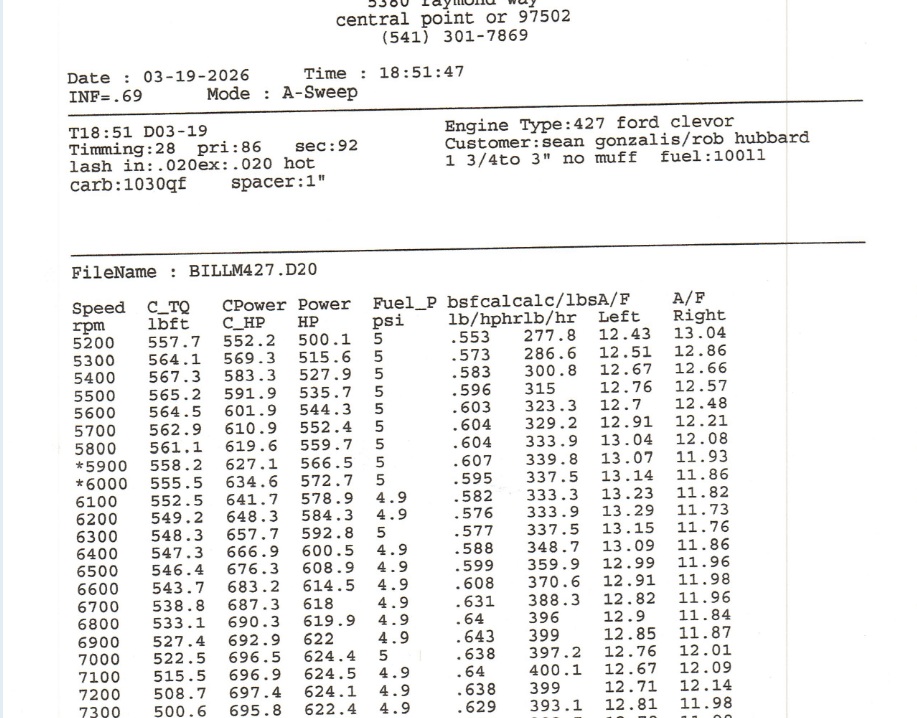
- Original.jpg (209.44 KiB) Viewed 9835 times
CUPS output:
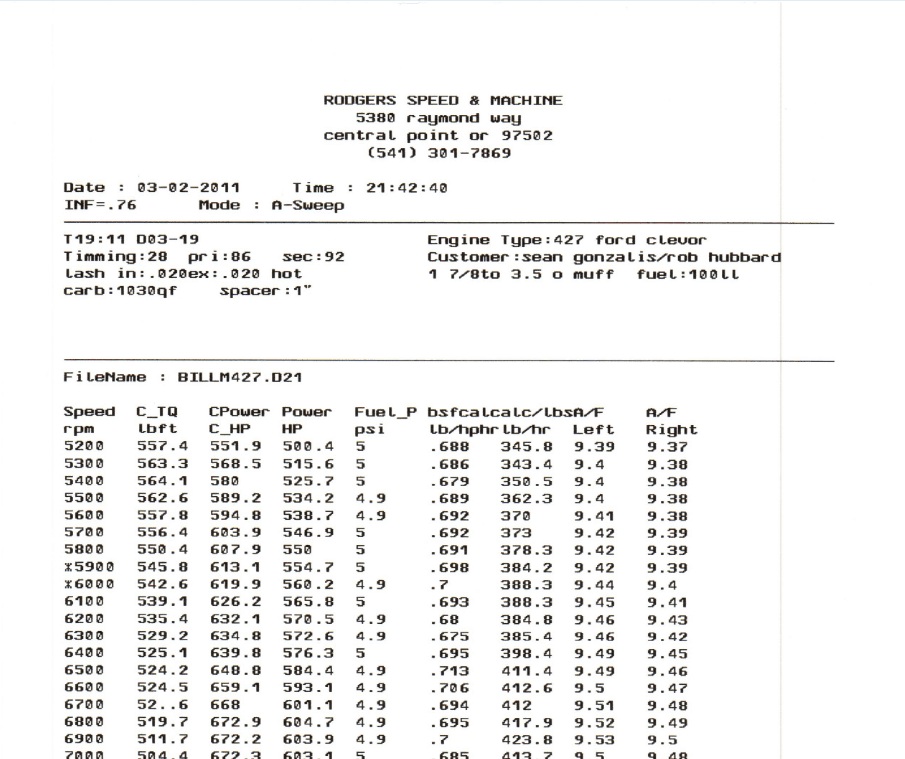
- CUPS.jpg (170.55 KiB) Viewed 9835 times
I don't know a much about the Dyno other than it is a Dynamic Test System (DTS) 4000G, the computer tower is ancient and runs on MSDOS. The company that made the dyno got bought out by a competitor and the product line abolished 2 decades ago, so very little data remains on the systems they made.

- Dynamic Test System DTS4000G.jpg (242.56 KiB) Viewed 9835 times
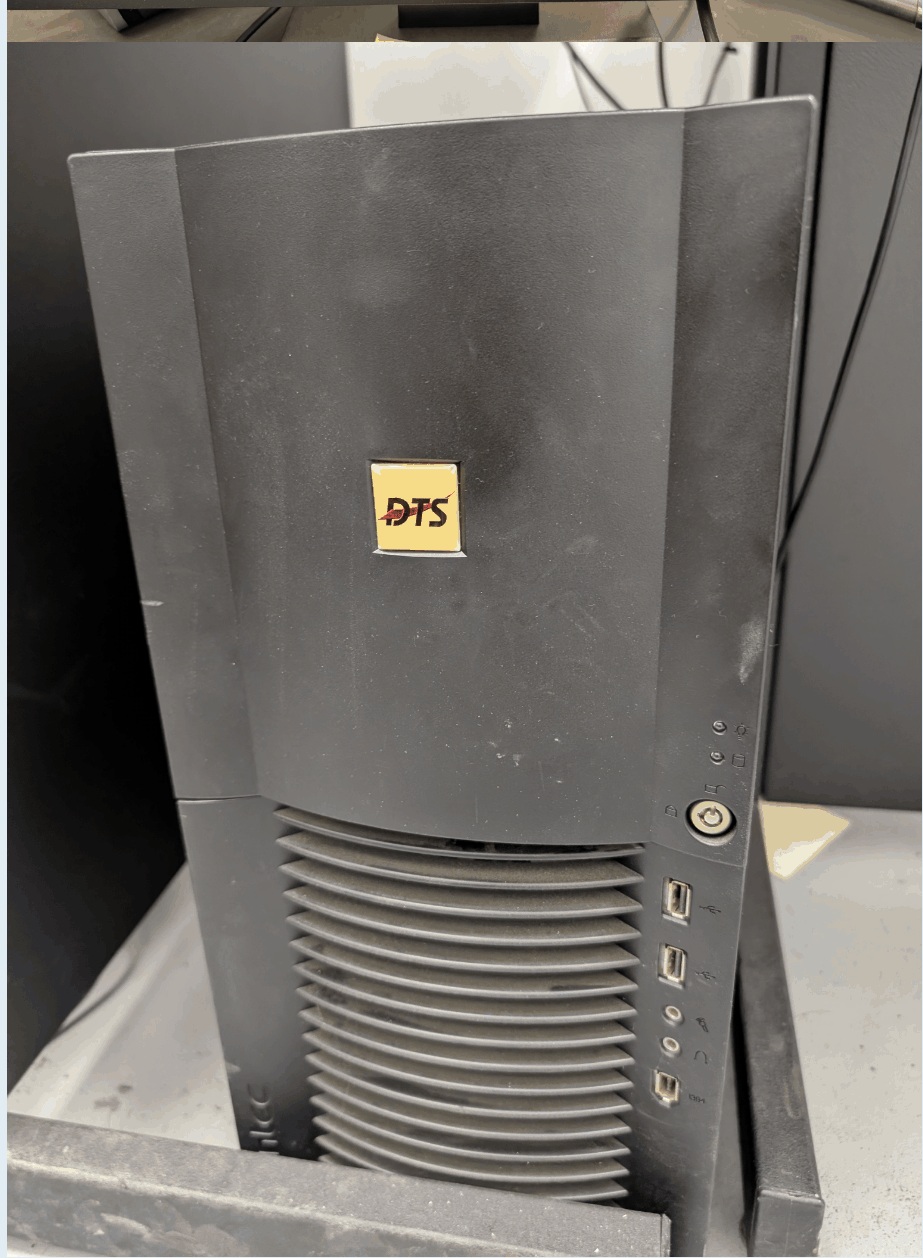
- DTS Computer.jpg (267.66 KiB) Viewed 9835 times
P.S. I could not upload ANY of the PDFs I wanted, nor any JPGs due to your 256kb file size restriction. This is extremely frustrating. Images haven't used that little data in decades. Consider bumping that up to 2mb.
Re: Dynamometer/MSDOS Printing
Posted: Mon Mar 23, 2026 7:26 pm
by RWAP
Email me the files.
The fonts are created by me - printer fonts built into the various printer makes are proprietary and actually not in a format which can be extracted.
Time for processing is something we keep trying to improve but there is only sj much we can do. Use the latest software which dues have improvements. Remember that a sit matrix printers starts printing as soon as it gets any data. However a modern printer expects an image of a printed page so nothing can happen until we have created the PDF on the Retro-Printer.
To get the fonts to match up you would need to change the font setting and/or use Font to create a custom font
I have updated the attachment size settings on here - oddly the jpgs in your post cannot be viewed in my region (UK) as you have hosted them on imagr
Re: Dynamometer/MSDOS Printing
Posted: Tue Mar 24, 2026 8:57 am
by RWAP
I have managed to view the files now (have modified original post to upload the images directly).
I can see there is a difference in the fonts - my guess is that the original printouts use scalable fonts built into the printer (see the y in particular) - whereas most dot matrix printers from back in the day used bitmap fonts (and that is what we have to use).
Even trying to create a scalable font which can be written to the PDF would not be easy as the emulator code would need to be rewritten to cope with positioning text at an absolute position within a PDF file taking account of font size etc
What was the original printer - HP or Epson model?
What are your configuration settings?
The raw files would help to see if a different font set could be used!
Re: Dynamometer/MSDOS Printing
Posted: Tue Mar 24, 2026 9:04 am
by RWAP
Looking at the PDF output you posted earlier - that was a much better printout - I wonder what you have changed?
Did you switch from HP emulation to Epson? The HP emulation uses built in PDF fonts to convert the PCL data to PDF as it is generally not based on bitmap graphics.
Re: Dynamometer/MSDOS Printing
Posted: Thu Mar 26, 2026 1:34 am
by RogueTech
I am honestly unsure as to what I did wrong. Something else that changed, I wouldn't even be able to upload the PDFs here now because when it is generating them they ALWAYS come out at exactly 379kb, which is way beyond the original 17kb I had before, and the RAW files are big too, like 680kb. I was tinkering around with settings in CUPS, I may have inadvertently screwed something up so to speak. One such setting was DPI. I'll have to check on that.
I will get back to the Dyno shop either March 26 or 27, so I will upload what I have then.
Re: Dynamometer/MSDOS Printing
Posted: Mon Mar 30, 2026 7:21 pm
by RogueTech
RWAP wrote: Tue Mar 24, 2026 9:04 am
Looking at the PDF output you posted earlier - that was a much better printout - I wonder what you have changed?
Did you switch from HP emulation to Epson? The HP emulation uses built in PDF fonts to convert the PCL data to PDF as it is generally not based on bitmap graphics.
Hello Rich,
I ended up figuring out the issue, USB_PASSTHROUGH was set to Yes, as was OUTPUT_PRINTER. So it must have been sending raw data to the printer which is why the font wasn't being retained. Another clue that lead me there was that emulation had no effect. Setting EMULATION to epson and using HP printer, it still printed and vice versa. But again it came out all crappy, so it must have just been the raw print data. Whatever was going on also caused increased processing times/increased file sizes. With USB_PASSTHROUGH off, processing time is less than 10 seconds.
Thankfully I did get your Retro Printer Module to successfully print using a brand new HP Color Laserjet 3301, however I still have one last issue to resolve.
The original HP DeskJet 5650 that the MSDOS box used for printing always printed characters in bold. However, whatever CUPS does it is stripping away the bold. I tried with 2 different HP printers and 1 Epson printer and they all spit out normal font. I dug through CUPS, dug through your documents and couldn't find anything about why this is happening and what to do to resolve it. I am attaching a PDF. First page is what the HP DeskJet 5650 would print out natively from the MSDOS box over centronics adapter, second page is the new HP Color LaserJet 3301 using RPM and last page is a HP OfficeJet Pro 8600 using RPM. As you can see the original font is MUCH more bold, and unfortunately the new laser printer seems to print the smallest variation of the font. Is there a way to increase font boldness or thickness somehow? (ignore skewing, that was a scanning mistake on my part, not related to RPM or CUPS)
P.S. Thank you again for all your help. I figured you might find these pictures interesting, so I am dumping all the pics I have of the DTS 4000G.
Re: Dynamometer/MSDOS Printing
Posted: Wed Apr 01, 2026 12:56 pm
by RWAP
Thanks for the pictures - they tell a 1000 words!
As for the BOLD issue - does the generated PDF show in bold? It might have been a DIP switch on the original HP printer to select bold by default. As we print the PDF the fonts in the actual printer should not make a difference, but you can try the command:
Code: Select all
lpoptions -p "HP Color LaserJet 3301" -o font=Courier-Bold
The name of the printer is probably wrong though.
Which emulation are you now using? I guess Epson? We could add a configuration option to enable bold by default without too much trouble.
Re: Dynamometer/MSDOS Printing
Posted: Mon May 04, 2026 9:05 pm
by RogueTech
RWAP wrote: Wed Apr 01, 2026 12:56 pm
Thanks for the pictures - they tell a 1000 words!
As for the BOLD issue - does the generated PDF show in bold? It might have been a DIP switch on the original HP printer to select bold by default. As we print the PDF the fonts in the actual printer should not make a difference, but you can try the command:
Code: Select all
lpoptions -p "HP Color LaserJet 3301" -o font=Courier-Bold
The name of the printer is probably wrong though.
Which emulation are you now using? I guess Epson? We could add a configuration option to enable bold by default without too much trouble.
Hello Rich,
I tried the command you suggested but it didn't work. On a whim I decided to look into that command a little more, running "lptoptions -l" gives me a list of available options for my printer and font change is not one of them. I tried a whole bunch of different steps related to CUPS and Debian but was not successful. I did as you suggested and checked the PDF, the PDFs are NOT bold which means either the conversion process from raw data to PDF is skipping over font being bold, or like you mentioned, may have been a dip switch thing with the previous printer. All things considered, the bold issue is NOT that big of a deal. Sadly however, a new much worse issue has happened.
Another thing that gets printed out are graphs, this doesn't happen much so the dyno owner never mentioned it to me. With the new RPM/CUPS/HP Laser Printer combo, the graphs are getting a big black box slapped on top. I have never seen anything like this and am unsure where to begin with resolving this issue. Please see the attached images inside the PDF and let me know what you think.